1 in 5 Engineering Job Posts Now Asks Candidates to Code With AI. Here’s How 41 Hiring Managers Test for It
How to interview developers for AI skills: 41 hiring managers share how they test candidates, from planted bugs to live sessions, plus a five-line script.
If you've hired developers recently, you’ve probably noticed that many candidates now list Cursor, Copilot, or Claude Code on their resumes and say they work with AI every day. That shows they're familiar with the tools, but it says little about how good they are with them.
Getting good output from these tools by using clear prompts and the right context is one skill. Using good judgment is the other: spotting when the AI’s work is wrong and knowing how to fix it.
Asking candidates which tools they use, or listing “AI experience” in the job post, won’t show you either one. You have to change how you interview developers to assess for AI skills.
I wanted to know how teams handle this in practice, so I asked dozens of hiring managers how they test for it. Most of them focus on judgment.
Below is what they told me, what one of our tech recruiters watches for on a screening call, and a five-line script you can use next week, whether you’re hiring in the US or hiring software engineers in Latin America.
- About 1 in 5 engineering job posts (19.9%) asks engineers to use AI tools to work faster. 76% of the hiring managers I heard from want engineers to use these tools, but wouldn't reject a strong candidate who doesn't. Before your interview, decide what good AI use looks like and create interview questions and a technical exercise to test for it.
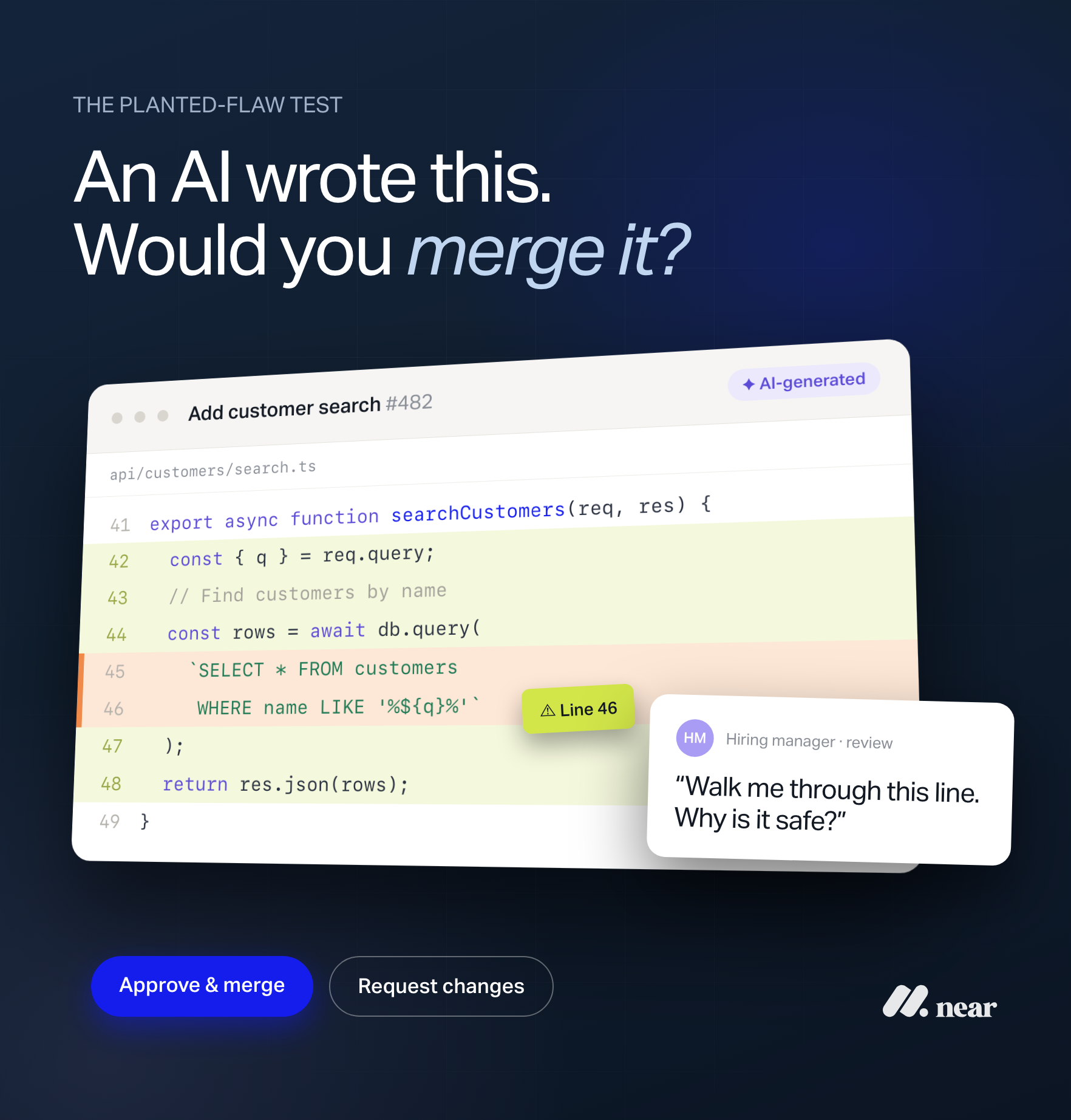
- In the technical exercise, give candidates real code and let them use AI tools. Then, plant a bug, a security flaw, or a contradiction the AI is likely to miss. About 4 in 10 hiring managers do this, and strong candidates can say where the AI got it wrong and what they changed.
- Decide whether candidates can use AI during the technical interview or assessment based on the job. If the role involves sensitive data or systems where AI tools aren’t allowed, test fundamentals without AI first. Otherwise, let candidates work the way they will on the job.
.svg)
What Do Engineering Job Posts Mean When They Ask for AI Skills?
“AI” and “artificial intelligence” now show up in many software engineering job posts. In fact, I looked at the engineering job descriptions US companies sent us between September 2025 and September 2026 and found that 49.4% mention AI in some form.
But not every AI requirement means the same thing. Some companies want AI developers who can build AI features into their products, while others want engineers who use AI tools to write code faster. To see how often each requirement appears, I grouped the engineering job posts by what they ask candidates to do with AI, counting each post only once.
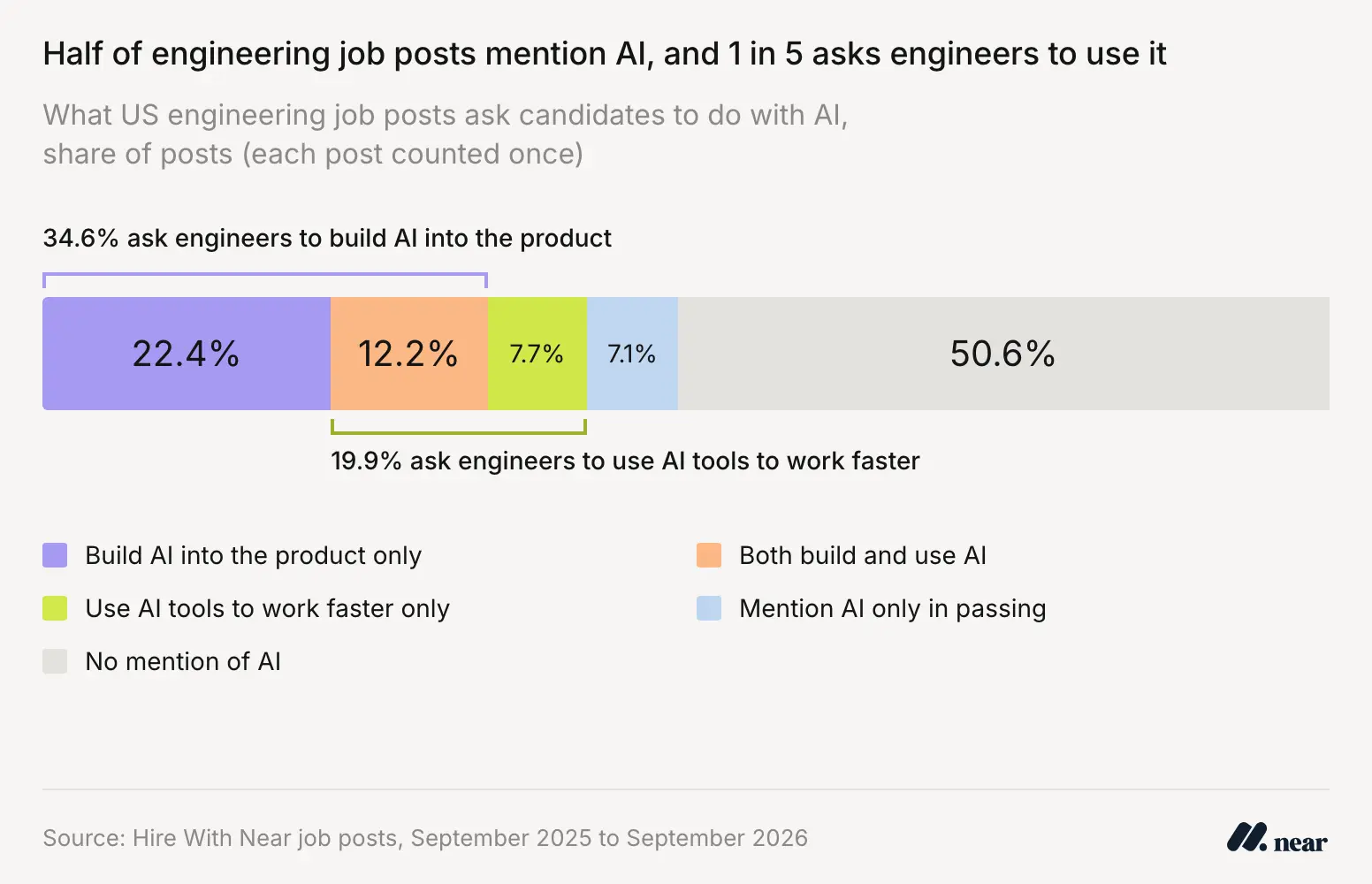
Of all the engineering job posts, 22.4% ask engineers only to build AI into the product, 7.7% ask them only to use AI tools to work faster, and 12.2% ask for both. Another 7.1% mention AI only in passing, which brings the total to 49.4% that mention AI. The other 50.6% don’t mention it at all.
Including posts that ask for both, 34.6% of engineering job posts ask engineers to build AI into products, while 19.9% ask them to use AI tools to work faster. This second group is the focus of this article.
Most job posts describe this as a general skill. Fewer than 1 in 10 engineering posts (7.7%) names a specific coding assistant. Cursor, Copilot, Codex, and Claude Code all appear in the data, but each shows up in only a handful of posts.
Since the job post rarely tells a candidate what good AI use looks like, it becomes part of the interview to clear that up. And the mix-up often starts before the interview, on the hiring side.
Julieta Gorodetzky, Tech Recruiter at Hire With Near, sees it on intake calls with clients: “AI engineers are not the same as engineers with AI usage, so we always have to make that distinction.”
Do Most Hiring Managers Require Engineers to Use AI Coding Tools?
For most hiring managers, AI coding tools are expected but not required. Of the 41 hiring managers who described their interview process to me, 76% want engineers to use these tools but wouldn't reject a strong candidate who doesn't. Only 12% make AI use mandatory.

The managers who do make AI use mandatory tend to lead small, AI-first teams, where each engineer’s output has a direct impact on what the company can ship.
For most of the others, what matters is how engineers work with these tools, whichever ones they pick. Ian Lovell, VP of Strategy and Technical Solutions at Reconext, an electronics repair and refurbishment company with sites in nine countries, explains how it works at his company: “On my team, we expect use of AI coding tools, but don't require them and don't care which specific ones a candidate uses to write working software.”
He also explained why testing for one specific tool misses the point:
It would test for ability to use the tool in a narrow set of circumstances, as opposed to truly testing for judgment, and the tool will likely change before that judgment does.
— Ian Lovell, VP of Strategy and Technical Solutions, Reconext
How Do Hiring Managers Interview Developers for AI Skills?
Most of the hiring managers I heard from test AI skills by watching candidates work: they put them in front of real code with their AI tools open and check whether they can explain and defend every line they keep.
What changes from one company to the next is the format. Four came up again and again:
Note: One of the 41 didn’t name one of these four as their main method, so the shares total 98%.
About 4 in 10 hiring managers described deliberately adding a problem to the exercise. It might be a bug, a security flaw, a conflict in the requirements, or an edge case the AI misses. The goal is to see whether the candidate catches it.
In the 2025 Stack Overflow Developer Survey, 66% of developers said their biggest frustration with AI tools is “AI solutions that are almost right, but not quite.” A planted flaw tests for exactly that.
1. Run a live session with AI tools open
This is the most common format. The candidate works on a small task in an existing codebase, uses whatever AI tools they normally use, and talks through what they're doing.
Roman Martynenko, Founding Engineer at Henry AI, a Y Combinator-backed startup that builds AI tools for commercial real estate brokers, keeps the task deliberately untidy:
The strongest signal comes from a small, messy, real-world task: unclear requirements, existing code, AI freely allowed, with the candidate narrating their decisions. A strong candidate reviews and tests what the tool generates, pushes back when it drifts, and can explain every line they ship.
— Roman Martynenko, Founding Engineer, Henry AI
Narration is the part that makes this work: you're listening for those moments where the candidate decides not to accept a suggestion, and why.
Runbo Li, CEO of Magic Hour, an AI video platform backed by Y Combinator, runs a live building session where candidates work on a problem similar to what his team would tackle that week. For him, the signal comes from what candidates catch:
A strong candidate doesn't just paste a prompt into Cursor and accept whatever comes back. They architect the approach first, use AI to accelerate the execution, then critically review and reshape the output. I watched one candidate catch a subtle race condition in AI-generated code within seconds because they actually understood what the code was doing, not just that it ran. That's the signal.
— Runbo Li, CEO, Magic Hour
2. Hand candidates AI-written code with planted bugs
A code review task is easier to set up than a live coding session. It also tests a skill developers use every day: checking code written by someone else, including AI.
Cyrus Kennedy, CEO of The Ad Firm, a digital marketing agency for small businesses, runs one of the most specific versions I heard:
Give someone 120 lines of AI-generated code for a feature (checkout page, something simple). Hide 2 bugs in it, one will be easy, the other will be hard (maybe it rounds 19.995 to 19.99 when it should round to 20). Give them 30 minutes to find and fix both. With any tool they want. They will most likely find the first bug in 5 minutes. If they continue to look and ask their AI what it thinks it's doing, then double-check that it's doing that, you have a good candidate.
— Cyrus Kennedy, CEO, The Ad Firm
Candidates who refused to use AI on the exercise usually found only the easy bug, too.
Edward Tian, CEO of GPTZero, a tool that detects whether a text was written by AI, sums up the mindset you’re hiring for: “I treat AI-written code like a pull request from a stranger. It looks right until proven right.”
Watch how candidates approach the code before prompting, and whether they keep looking for problems after fixing the first bug.
3. Ask them to walk you through work they've already done
The third most common format is a walkthrough of a project the candidate already built. There's nothing to set up, and the questions do the work.
Ian Lovell at Reconext used this approach and described what happened:
One of the engineers last year brought in a stock reconciliation tool he wrote for his previous employer. In the interview, he immediately said the first version was written by Claude, and it fell over with real data because it assumed all records had timestamps. He then wrote the matching code from scratch. We hired him.
— Ian Lovell, VP of Strategy and Technical Solutions, Reconext
Lovell also recommends asking candidates about earlier versions of their work. What did they try before settling on the version they shipped? “A strong engineer will recall versions they threw away long ago. Weak ones will not recall them and get hazy when pressed for an answer,” he says.
Oscar Moncada, Co-founder and CEO of Stratus10, a cloud consulting firm that helps companies build and run systems on Amazon Web Services, takes a similar approach. He asks candidates to share a code sample, then has one of his engineers review it with them in detail. He's noticed a pattern:
AI tends to make assumptions and write longer code, while a person usually writes succinctly, goes back to improve it, and can explain each change, so the walkthrough shows quickly who did the thinking.
— Oscar Moncada, Co-founder and CEO, Stratus10
Listen for specific details about what broke and what the candidate changed. If they can summarize the project but struggle to explain a single function, that's a reason to dig deeper.
4. Allow AI on the take-home, then spend the debrief on decisions
The take-home was the least common method, and some teams have even dropped it. Oscar Moncada's company moved away from take-home projects for a simple reason: “We'd have to figure out whether ChatGPT wrote it.”
Teams that still use the take-home approach assume candidates will use AI and focus on their decisions during the follow-up interview. Orrin Klopper, Co-founder and CEO of Netsurit, a managed IT and security company with more than 300 people, combines a case study with a code review task:
We assess it in the normal process with a practical case study where AI is allowed, plus a review task where the candidate critiques AI-generated code. A strong candidate shows the prompt trail, tests the output, explains tradeoffs, checks security, and says what they rejected.
— Orrin Klopper, Co-founder and CEO, Netsurit
Listen for a clear account of what candidates kept, what they changed, and why.
How Can You Tell If a Developer Uses AI Well?
A developer uses AI well when they can say where the AI was wrong, what they changed, and how they checked the result. Of the four methods above, the walkthrough of past work is the quickest way to find that out, because it's hard to hide behind a tool name when you're explaining your own project.
When a developer says they use AI to code, Julieta starts with the basics: what they use it for, which tools they use, and how much of their work they do manually versus with AI.
Then, she asks a question that gets closer to the skill itself:
I usually ask how they use AI and still keep their code clean. A good answer is following clean code practices and doing reviews.
— Julieta Gorodetzky, Tech Recruiter, Hire With Near
In her experience, seniority makes a difference. AI tends to help senior developers more than junior ones, because junior developers often don't know how to use it properly yet, so they rely on it in ways that don't help much.
She also asks for examples: what they accomplished with AI, whether it made their job easier, and whether they've set up any automation that helped them or their team. “If they can provide clear examples, it's helpful,” she says.
Julieta uses a similar approach when checking how much of a project a candidate really worked on. She pays attention to answers that give credit to the whole team but don't explain the candidate's own contribution:
They always respond with ‘we, we…’ ‘We did this’, ‘my team created’, all of those things. That means you didn't do it, your whole team did it.
— Julieta Gorodetzky, Tech Recruiter, Hire With Near
Her response is to get specific: “What was your responsibility? What did you accomplish doing this? What was the main feature that you've developed end-to-end?”
For hiring managers, that's a useful way to assess AI skills too. If a candidate says their team built a feature, dig into their individual contribution. Find out where they used AI, what they changed, and how they knew the final result worked.
According to Julieta, this is also the kind of detail companies increasingly want before moving candidates forward.
At Hire With Near, that information can help clients get a clearer picture of a developer's experience before the technical interview. Our tech recruiters cover candidates' backgrounds, communication, and past work in the first round, while the client's engineers assess their technical skills. When clients want to evaluate AI-assisted development specifically, we can also help them build that into the technical assessment.
Should Every Developer Interview Allow AI?
Most of the hiring managers I heard from allow AI during at least part of the interview. Only one of the 41 explicitly bans it from a core interview round. Where they disagree is what to test first: a candidate’s technical reasoning without AI, or how they work with AI tools.
Aaron Whittaker, VP of Demand Generation and Marketing at Thrive Internet Marketing Agency, a digital marketing agency that also builds its own internal software tools, takes the first approach:
I strictly prohibit AI during the core coding interview because I need an unclouded view of a candidate's actual technical reasoning. Their AI competency is evaluated in a separate phase later on.
— Aaron Whittaker, VP of Demand Generation and Marketing, Thrive Internet Marketing Agency
His reasoning comes from the job itself: “An engineer on our team may need to investigate a production issue, review another developer's work, or work inside a system where an AI assistant is unavailable or inappropriate.”
Evidence suggests developers can misjudge how much AI helps them, which supports testing some fundamentals on their own. In a 2025 study by METR, a nonprofit that researches what AI systems can do, experienced open-source developers using early-2025 AI tools took 19% longer to finish tasks, but still believed AI had sped them up by 20%. A candidate's own account of how much faster AI makes them isn't proof that it does.
The other side has a strong argument too. Roman Martynenko at Henry AI thinks a ban backfires because it “just selects for people willing to lie about how they work.”
Based on these conversations and what I've heard from our recruiters at Hire With Near, here's how I'd decide:
- Ban AI for the first round when fundamentals matter independently of AI: If the role involves sensitive data, production incidents, or systems where AI tools aren't allowed, test technical reasoning without AI. Then, move on to testing candidates on AI-assisted development in a separate round, as Thrive does.
- Allow AI when it's part of the everyday job: Give candidates access to the tools they'd use at work, then evaluate how they check the output, catch mistakes, and explain their decisions. The goal is to see who can use AI without giving up technical judgment.
Julieta has seen clients turn candidates down over AI in both directions. Some reject developers who used AI in a technical assessment or coding exercise “without checking it or without their own personal touch-ups.” Others pass on more old-school developers who don't use AI at all, because they tend to work more slowly.
What Should Your Next AI Skills Interview Include?
If you’re still working out how to interview developers for AI skills, you don’t need to redesign your entire interview process. Based on what these hiring managers told me and my conversation with Julieta, I put together a five-line script that shows how a developer uses AI, checks its output, and makes decisions about the code they keep.
Before jumping into the technical exercise, give the candidate a chance to meet your team and understand what the exercise is meant to show. Julieta recommends this sequence because candidates tend to do better when they know who they're working with and what's expected of them.
Keep the script next to you in the interview, and give every interviewer on the panel the same version so you're comparing candidates on the same five answers.
If you want more question ideas for the rest of the loop, our list of technical interview questions covers fundamentals, system design, and remote collaboration. To check depth beyond AI use, see 5 interview questions to spot a fake senior developer.
Final Thoughts
The hiring managers who get this right care less about how fast a candidate ships and more about whether they notice when the AI is wrong. Plant a flaw in a real exercise, let candidates use the AI tools they’d use on the job, and ask them to walk you through what the AI got wrong.
This article is one part of a larger look at how US companies are hiring software engineers. The full report on why nearly half of US companies hiring engineers in Latin America are leaving an offshore team or outsourcing firm also covers what skills they ask for.
If you’re hiring software engineers based in Latin America and want help with that process, Hire With Near’s recruiters source the candidates for you and run the first-round screening, covering candidates’ backgrounds, communication skills, and past work. And if you need help designing and administering the AI-assisted part of your technical assessment, they can advise you on what to consider.
Book a free consultation to talk through your engineering roles and get salary benchmarks.
Or if you’re just starting to consider hiring a developer, our guide to hiring developers in Latin America walks through the whole process.
Free Download: The 2026 State of LatAm Hiring Report
We studied data from 2,000+ remote LatAm hires to reveal how top US companies use nearshore hiring to grow faster and recruit top talent while saving $35,000+ annually per hire.

Methodology
How I got these numbers
Job-post data: Hire With Near’s team analyzed the engineering job descriptions that US companies sent Hire With Near between September 2025 and September 2026. Our team coded each post for whether it asks the engineer to build AI into the product, use AI tools to work faster, both, or neither. These figures describe one agency’s clients, not the whole US market.
Hiring manager responses: In October 2026, I asked hiring managers whether they require AI coding tools, how they test for AI-assisted development, and whether they think banning or requiring AI is a mistake. 64 people responded. I counted the 41 who hire engineers directly and described their own interview process, and I left out responses from people who don’t hire engineers or described a hypothetical process. Shares are rounded, and each hiring manager is counted once, under the method they described as their main one.
Recruiter perspective: From an interview with Julieta Gorodetzky, Tech Recruiter at Hire With Near.